
By LensPT Team · Published November 27, 2026
Progressive lens markings help a receiving lab identify the design that arrived and find the points where a technician should check its power. Keep each sample with its own envelope. Read the visible ink, locate the permanent engravings, and match both to the supplier’s chart for the exact design before releasing the lens for edging.
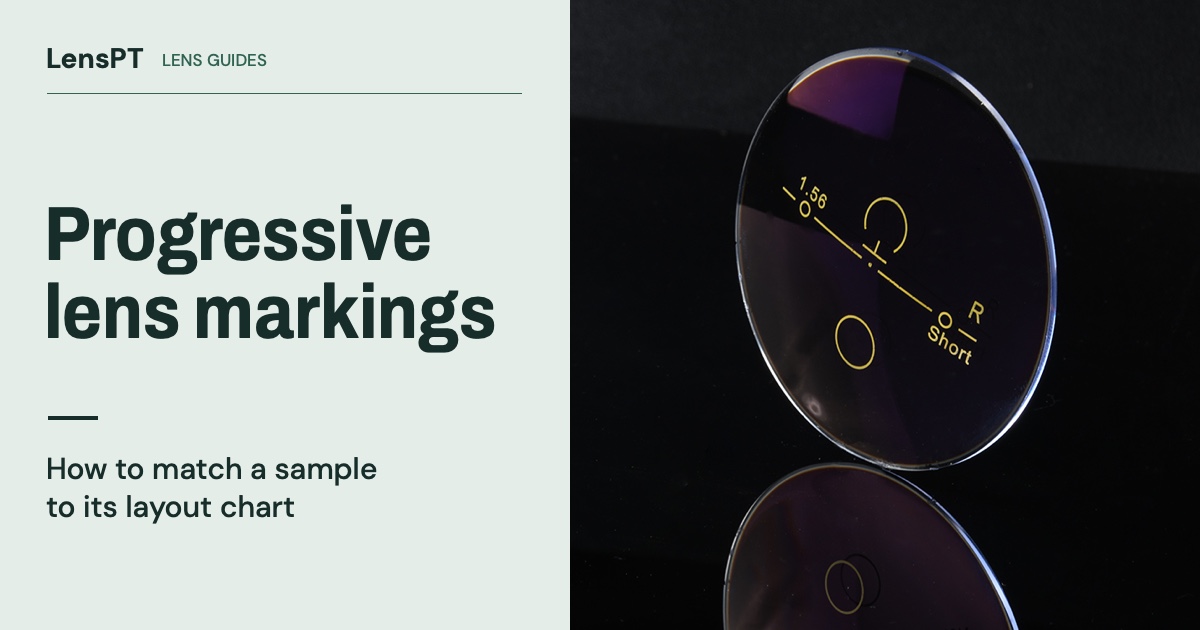
Look at the sample in the cover photograph. The yellow print includes an R and the word “Short.” Those details are worth recording as supplied. To enter a corridor length in millimeters or confirm the ordered addition power, the receiving team still needs the design reference and its marking key.
Table of Contents
1. Separate the two kinds of progressive lens markings
Temporary ink makes layout and inspection points easy to see. The fitting cross identifies the position the manufacturer uses for fitting. The chart also shows where the lab checks distance power, near power and prism. Since a progressive lens changes power across its surface, moving the measurement point changes what the instrument reads.
Permanent, faint engravings give the lab reference marks it can find again once the ink has been removed. Depending on the design, nearby symbols or numbers can identify the supplier, design family or addition power. Write down the exact characters and their positions. A short description such as “two circles” loses information that may distinguish one design from another.
| Feature | What it is used for | Entry on the receiving record |
|---|---|---|
| Temporary ink layout | Locating fitting and verification areas on the supplied layout. | A photo of the inked lens, with its right or left side identified. |
| Permanent alignment marks | Orienting the lens on the matching manufacturer’s chart. | A sketch or legible image showing both marks in position. |
| Design or addition codes | Matching the observed characters to the supplier’s key. | The characters as seen, followed by the value the chart assigns. |
| Lens envelope or job ticket | Connecting the physical sample to the order. | Order line, side, design reference and ordered addition in diopters. |
The Vision Council describes the roles of removable ink, permanent engravings and the different reference points in its technical guidance. Use the chart for the delivered lens when locating those points. The Vision Council’s Lens Marking Guidelines (PDF)
2. Match the engravings to the correct chart
Start with the design name or code on the envelope and the stated eye. Ask for the current layout for that exact design and variant. With a private-label order, also request the supplier’s correspondence between its production code and the name on your packaging. Keep that correspondence with the approved sample.
Have the technician orient the lens using its permanent alignment marks and the chart’s stated viewing direction. If a printed chart is used as an overlay, check its scale before placing the lens over it. A fit-to-page printout can move the apparent position of the fitting cross even when the two documents carry the same design name.
If a supplier name is missing, The Vision Council’s EPIC catalog can help identify candidates from their engravings. It covers designs distributed in the United States and Canada. A candidate gives you a design to ask about. For a purchase decision, have the supplying lab confirm the match to the specific order. Electronic Progressive Identifier Catalog
3. Reconcile the chart, sample and order line
Compare the identified side, design and addition power with the purchase line. Include the corridor variant when specified. Then have the lab perform the relevant power checks at the manufacturer’s reference points. Reading the addition code establishes what the lens is marked as. The lab’s measurement is a separate entry.
| What the receiver has | Action | Record before release |
|---|---|---|
| Right lens ordered with +2.00 D addition | Copy the observed addition characters exactly and check the key for this design. | Ordered value, observed code and decoded value. |
| The key for the delivered reference indicates +2.50 D | Keep that lens with its envelope and hold the affected line for clarification. | Photo of the marks, order reference and chart revision sent to the supplier. |
| Supplier provides a corrected reference or replacement | Have the lab repeat the comparison and the applicable verification. | Resolution, final lab result and release decision for this sample. |
The values above illustrate an incoming check. A buyer should be able to trace the decision later from the envelope to the chart and then to the lab’s result. That trail also helps when a repeat order uses a revised design under a familiar commercial name.
Questions from optical buyers
Can the lab check progressive lens markings after the ink is gone?
If the permanent references are legible and the exact chart is available, the lab can use them to restore the layout. If one mark is unreadable, retain the lens and its original envelope, photograph what is visible and request identification from the supplier before edging.
Does “Short” tell me the corridor length?
It identifies a named variant on the sample shown. Ask the supplier for the corridor specification and minimum fitting height for the quoted design. Record each in its own field. LensPT’s progressive order guide covers the other information needed before production. Progressive lens ordering checklist
Request a progressive sample and its marking chart
For a LensPT inquiry, send the design, corridor option, nominal index, diameter, coating and quantity. Include the addition range you plan to buy and ask for the chart that matches the sample’s progressive lens markings. LensPT clear progressive lens specifications · Request a progressive lens sample quotation